$50
Default spend cap
Owner can set $10 to $10,000
80%
First notice
A second one at the cap itself
$6
Most one call can cost
30-minute ceiling at $0.20 a minute
0
Messages lost at the cap
Every message is still stored
What does each pricing model let you cap?
Every AI support bill has a part that stays put and a part that moves. Capping the cost means limiting the part that moves.
| Pricing model | What the bill follows | What you can limit | Where it surprises you |
|---|---|---|---|
| Per seat | Headcount, plus AI add-ons | The seats in the contract | AI resolutions billed on top of the seats |
| Per resolution | Conversations the vendor counts as resolved | Sometimes a committed volume | The definition, the minimum, and the rate past the commitment |
| Usage | Replies and voice minutes | A hard monthly spend cap | A spike in volume, which is what the cap is for |
Per-seat suites look capped because the seat count is fixed, but the AI usually has its own line. As of October 2026, Zendesk includes 5 automated resolutions per agent a month on Suite Team and 10 on Professional, then charges $1.50 for each one on a commitment or $2.00 pay-as-you-go. The seat line is flat; the AI line follows your volume anyway.
Per-resolution pricing follows outcomes, as the vendor defines them. As of October 2026, Freshdesk's Freddy AI Agent includes 500 sessions, then charges $49 per 100, and Gorgias charges $0.90 per automated interaction on an annual plan or $1.00 monthly. Those are prices, not limits.
Usage pricing follows the work. Wiredesk charges $0.02 per agent reply on chat, email and WhatsApp and $0.20 per started voice minute for anything past what your plan includes. Because that line moves with volume, every workspace has a hard cap on it.
At a glance
A hard cap limits the part of the bill that moves, and decides in advance what stops
- 1What it limits2¢ · 20¢Per reply, per voice minuteOnly usage past your plan counts against the cap. The plan fee never does.
- 2Size it$700 → $1,000A normal month, plus a thirdEnough for one bad week. The $50 default would stop this team on day 11.
- 3Hear first80% · 100%Two emails to the ownerThe first while raising the cap is still a choice. Only the owner can raise it.
- 4At the cap0 lostEvery message is stored
- ChatTold it's unavailable
- Email, WhatsAppWaits, unanswered
- PhoneNo new calls
- Zendesk MessagingGoes to your team
What is a hard spend cap?
Three different things get called a cap, and only one of them is.
- A budget alert emails someone when spend passes a number. The bill keeps growing.
- A soft cap asks for approval or pauses something optional, but keeps answering and billing.
- A hard cap stops billable work at the limit. The bill can't pass it, because nothing past it gets done.
A hard cap moves the risk from finance to the queue: past the limit, customers stop getting AI answers. So what happens at the limit matters as much as the number. Five things should be true:
- You hear before it happens, while raising the limit is still a decision.
- Nothing the customer sends is lost.
- The customer is told something honest, or the conversation goes to a person.
- Raising the limit starts the agent again at once.
- Work already under way is bounded, so a long call can't run far past the limit.
Rule of thumb
If a vendor's "cap" only sends an email, it is an alert. Ask what stops, on which channel, and what the customer sees.
What does Wiredesk stop at the cap?
The spend cap limits what you pay past your plan's included usage. The plan fee and the allowance never count against it. It starts at $50 a month, and the owner can set it anywhere from $10 to $10,000. Nobody else can change it, and every change goes in the activity log. The owner is told at 80% of the cap and again when it is reached. Both notices are always sent by email, since they have no agent to text from.
A month under a spend cap
- 1st of the monthUsage resetsThe plan's included usage starts again. Unused allowance doesn't roll over.
- Allowance used upBilling startsReplies at $0.02 and voice minutes at $0.20, counted against the cap.
- 80% of the capOwner emailedThe first notice, while raising the cap is still a choice.
- 100% of the capBillable work stopsThe owner is emailed again. Every message is still stored.
- Cap raisedAgent resumesOn the next message. Nothing has to be restarted.
When usage past the plan reaches the cap, each channel stops like this:
| Channel | At the cap |
|---|---|
| Website chat | The message is stored, and the visitor is told the assistant is temporarily unavailable and to contact the business directly |
| Email and WhatsApp | The message is stored, and no reply goes out until the cap is raised or the month rolls over |
| Phone | New calls aren't taken. A call already running ends with a short closing line just before the minutes the limit pays for run out |
| Zendesk Messaging | The conversation goes to your team in Zendesk |
| Tests and the API | Browser voice tests and simulated-customer tests don't run, and the API returns a spend-cap error |
Raising the cap starts the agent again on the next message. Replies your team types aren't billed, so the inbox keeps working. On Free with no card, the agent stops when the included usage runs out, and nothing past it is billed.
One edge case is worth knowing. A call's budget is set when it starts, from what is left under the limit, so two calls at once can each be given the same remaining minutes. Any overrun is bounded by how many calls run at the same moment.
How do you size the cap? A worked month
Price the month first, at list rates:
| Line | Arithmetic | Amount |
|---|---|---|
| Text replies | 20,000 × $0.02 | $400 |
| Voice | 3,000 minutes × $0.20 | $600 |
| Usage at list rates | $1,000 | |
| Included in Scale | −$300 | |
| Past the plan | $700 | |
| The month's bill | $199 + $700 | $899 |
What the cap covers, and what it doesn't
- $300Included in Scale
- $700Past the plan, billed
- $300Room left under a $1,000 cap
The $199 plan fee sits outside the cap. The bill is $199 + $700 = $899.
Now apply the default cap. At $50, the month's limit is $300 + $50 = $350 of usage. Spread evenly, this team uses about $33 a day, so the agent stops answering around day 11. The 80% notice comes at $40 past the plan, roughly seven hours before the stop. That is why the default is a number for a pilot, not for production.
Set the cap from the month instead. A normal month runs $700 past the plan, so a $1,000 cap leaves room for a bad week. If a product incident doubles volume for seven days, that adds about $233, for $933 in all. The 80% notice arrives at $800 and the agent keeps answering. Beyond that, it stops at $1,000 and you decide.
The same month under two caps
- Normal month: $1,000 of usage
- With an incident week: $1,233
Then check the plan. The same month on Growth ($49, with $60 included) is $49 + $940 = $989, or $90 more than Scale. Past your allowance every month, the next plan up often costs less than the overage.
For scale, those replies and minutes are about 9,500 conversations: 3,750 chats at four replies each, 5,000 emails answered in one reply, and 750 calls of four minutes. If 60% were resolved without a person, that's 5,700 resolutions. At Intercom Fin's published $0.99 per outcome (as of October 2026), that comes to about $5,640.
One month, three ways to pay for it
- Wiredesk Scale$899$199 + $700 past the plan
- Wiredesk Growth$989$49 + $940 past the plan
- Per resolution, $0.99$5,6435,700 resolutions, seats extra
What cap fits a team your size?
The rule from the worked month works at any size: take a normal month's usage past the plan, add a third, and round up. A week of double volume adds 7 ÷ 30, about 23%, to a month, so a third covers one bad week with room left over. Every figure below uses the list rates and the plan that costs least for that month.
| Team | Month at list rates | Plan | Past the plan | Bill | Cap to set |
|---|---|---|---|---|---|
| Chat and email, 4,000 replies | $80 | Growth | $20 | $69 | $50, the default |
| Adds a phone line, 10,000 replies and 1,000 minutes | $400 | Scale | $100 | $299 | $150 |
| Harbor & Pine, 20,000 replies and 3,000 minutes | $1,000 | Scale | $700 | $899 | $1,000 |
| Large, 60,000 replies and 10,000 minutes | $3,200 | Scale | $2,900 | $3,099 | $4,000 |
At the top row, the default is already enough. At the bottom, it is worth asking about Enterprise, where volume rates and a cap set to your volume are part of an annual contract. The pricing calculator runs this on your own volume, and what AI support costs per conversation works through a larger month.
How do you set the spend cap in Wiredesk? Step by step
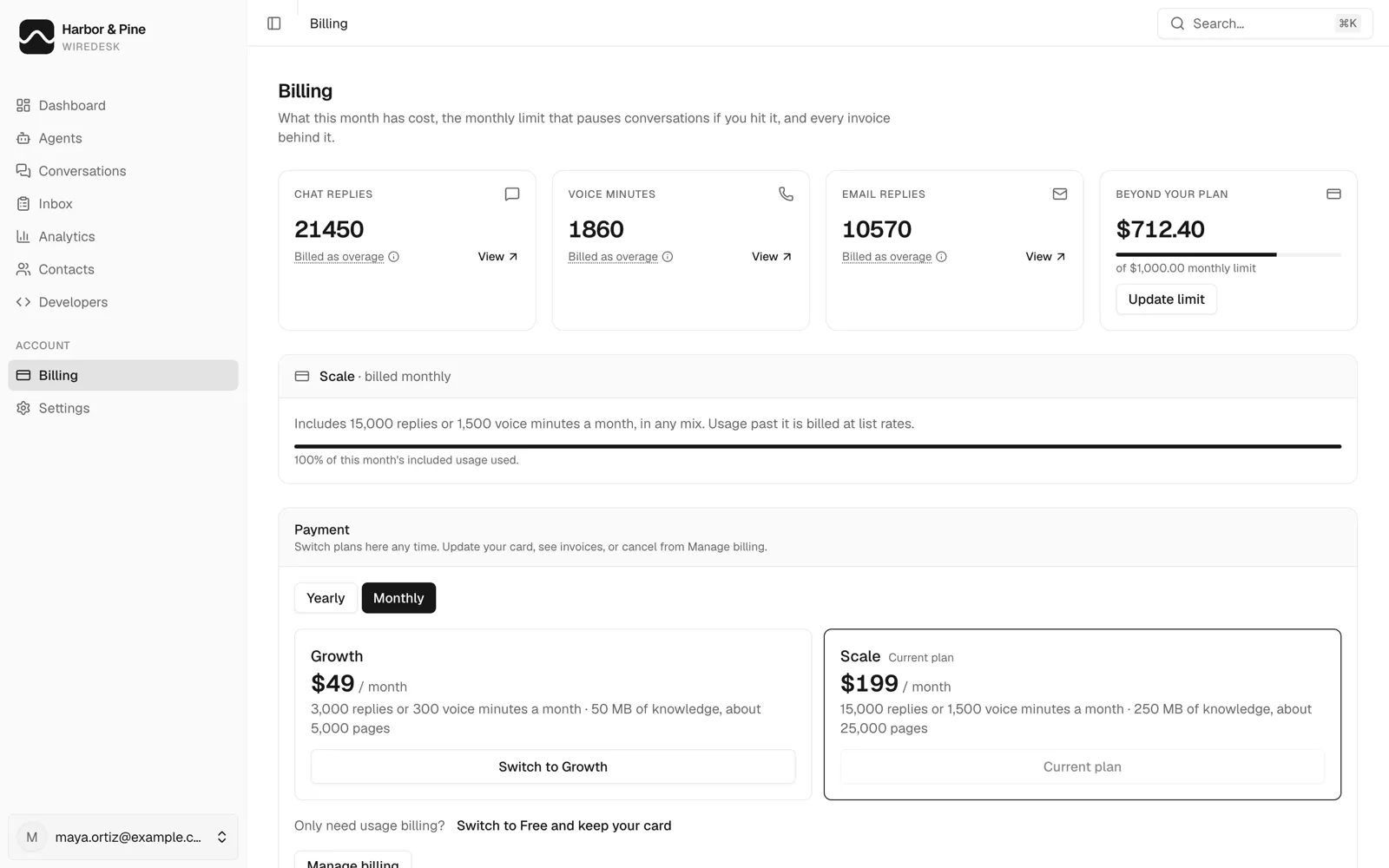
Step 1: Open Billing and read the month so far
Billing in the console shows the month's chat replies, voice minutes and email replies, and what they have cost beyond your plan, against the cap. The console calls the cap your monthly limit. Below that is the plan and how much of its included usage is gone: Scale includes 15,000 replies or 1,500 voice minutes a month in any mix, which is the $300.
Step 2: Set the cap from a real month
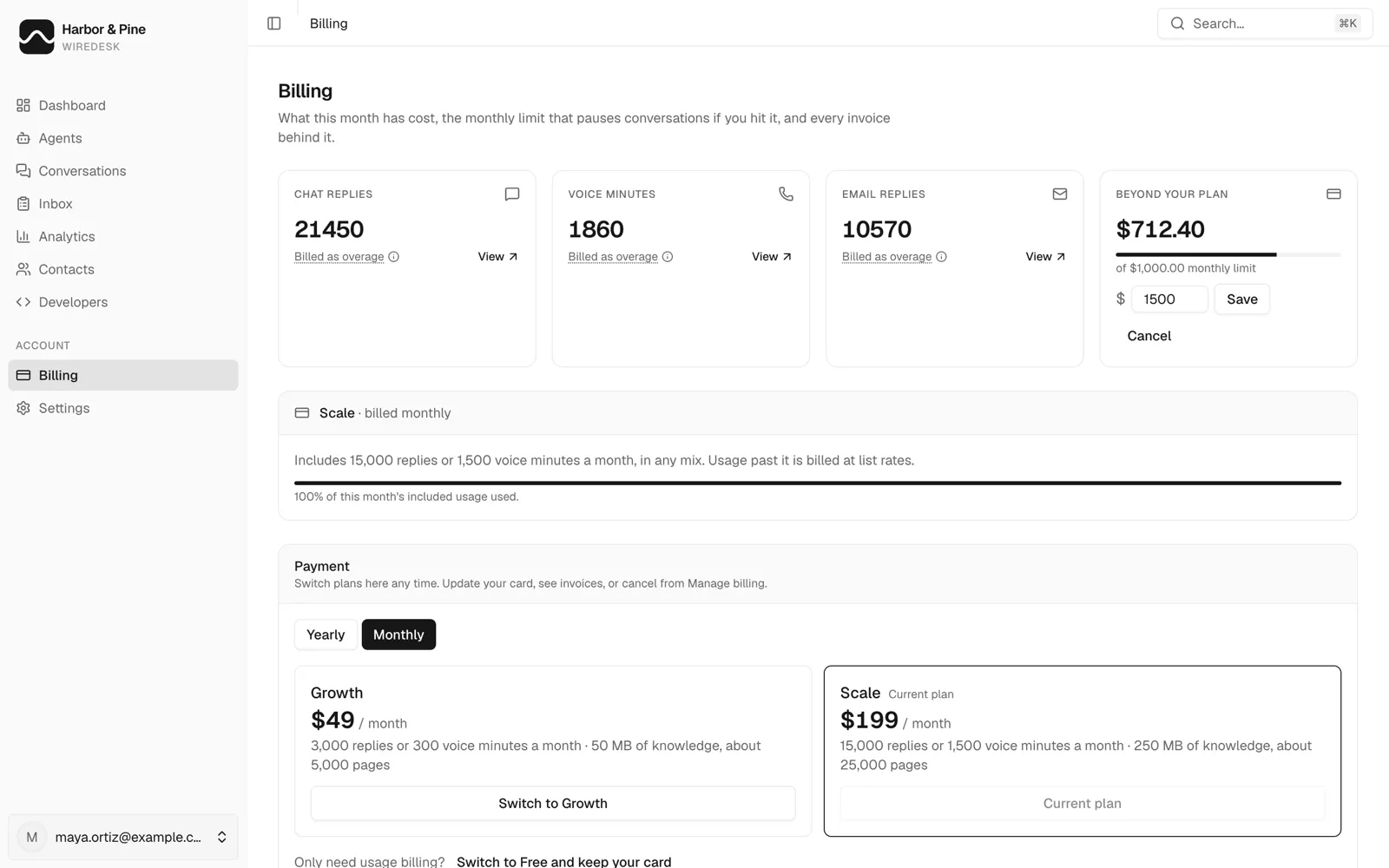
Select Update limit and enter the new amount. Only the workspace owner can change it, to anything from $10 to $10,000. It applies straight away, to the current month, and the activity log records who changed it.
Step 3: Put a ceiling on any one conversation
The spend cap bounds the month. Two more limits bound a single conversation:
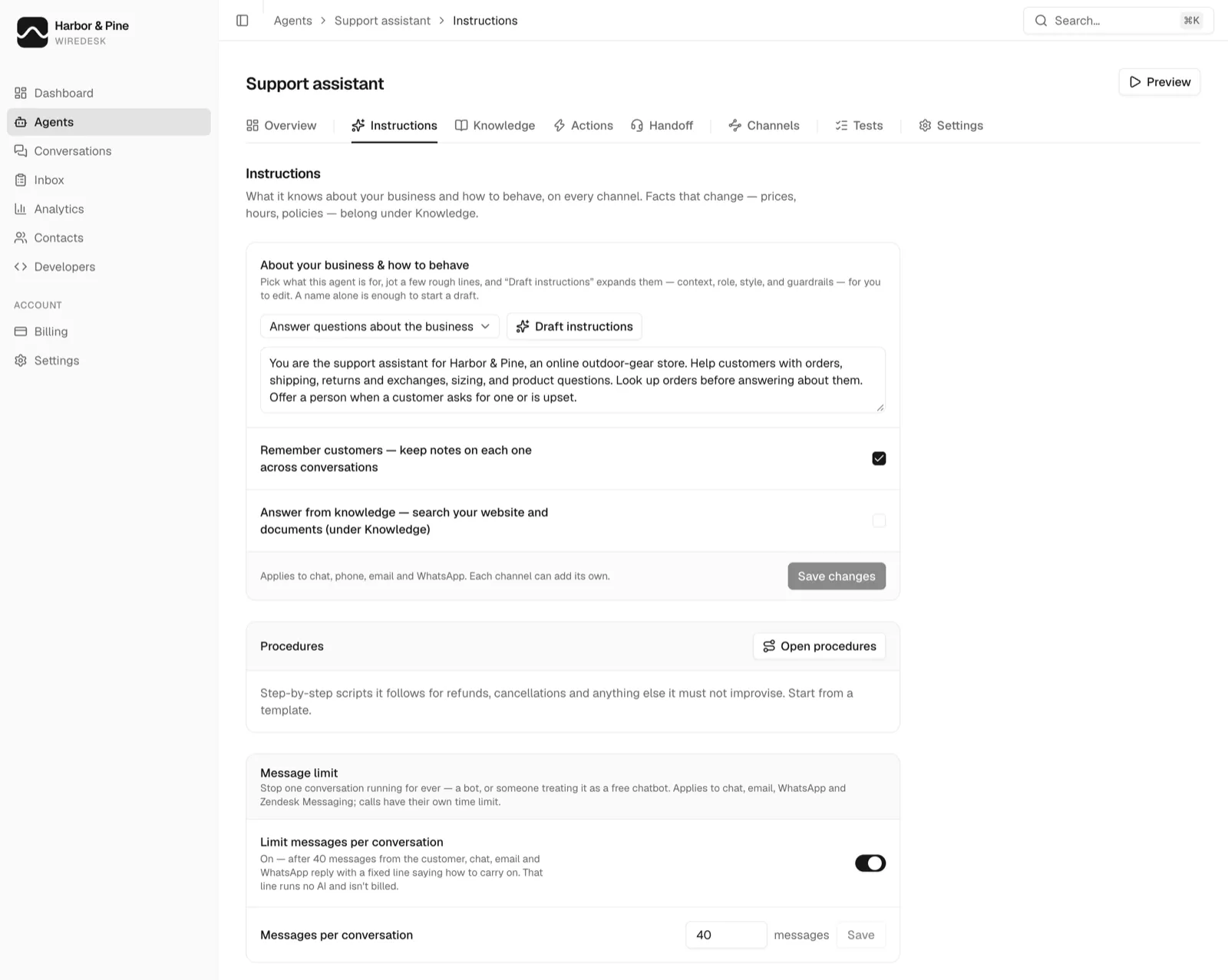
- A message limit per conversation. It's off by default and can be set from 1 to 1,000 customer messages. Past it, chat, email and WhatsApp send a fixed reply that runs no model and isn't billed, which stops a bot holding the agent for three hundred messages.
- A 30-minute ceiling on every call. A single call can never cost more than $6.
The message limit is set per agent, under Instructions.
Step 4: Check it after the first month
Compare the month's usage past the plan with the cap. If the 80% notice arrived before the last week, raise the cap or move up a plan. If the month ended far below it, leave the cap where it is: a higher cap costs nothing unless the agent uses it.
What should you ask a vendor about overages and minimums?
- What is the billing unit, and who defines it? Anyone can count a reply or a minute. A "resolution" is counted by the vendor's rules, so read them first.
- Is there a minimum or a platform fee? As of October 2026, Fin requires 50 outcomes a month when it runs on another helpdesk, and Lorikeet's Start plan has a $2,100 monthly base before its $0.99 chat and $1.50 voice resolutions. No cap lowers a minimum.
- What does flexibility cost? As of October 2026, Zendesk's extra automated resolutions cost $1.50 each committed and $2.00 pay-as-you-go, a third more for not committing.
- Is there a hard cap, and who can set it? Ask whether it stops work or only sends an alert.
- What does the customer get at the cap, on each channel? "The bot stops" isn't an answer for a phone line.
- Who is told first, and when? One notice at 100% is too late to act on.
- Does unused allowance roll over? At Wiredesk it doesn't. It resets on the first of each month.
- What counts as usage? At Wiredesk, test conversations count and your team's replies don't.
The AI customer service RFP template puts the minimum, overage and spend-cap questions into a vendor questionnaire, so every vendor answers them in writing.