5
Passages per question
The closest five, and only those
1,200
Characters per passage
Cut before a heading where it can
20 MB
Per uploaded file
The first 1.5 million characters
15 min
Synced articles re-read
Only the ones that changed
What can an AI support agent actually read?
Only what it is given, in a form it can turn into text. In Wiredesk that means three kinds of source, each with limits worth knowing before you plan the work:
| Source | What gets in | Limits |
|---|---|---|
| Website crawl | Public pages a signed-out visitor sees, from the sitemap and the links on each page | Up to 10,000 pages per site, 40,000 characters per page, 2,000 sitemap entries planned |
| Uploaded files | PDF, Word, Excel, CSV, HTML, Numbers, OpenDocument, plain text and Markdown | 20 MB per file; the first 1,500,000 characters of its text |
| Synced help center | Articles from Zendesk Guide or Intercom Articles, and pages from Notion or Confluence | Changed articles are re-read every fifteen minutes |
Some things never get in. A page behind a login isn't read. A PDF linked from a help article is skipped by the crawler, so upload it as a file instead. A page with almost no text is dropped. Words that only exist inside an image or a screenshot aren't text, so the agent can't see them. PDF to Markdown shows you what text a PDF actually holds before you upload it.
Every plan also has a knowledge allowance, counted in characters of indexed text rather than file size. A 20 MB scanned manual that yields 50 KB of text costs 50 KB.
| Plan | Knowledge allowance | Roughly |
|---|---|---|
| Free | 5 MB of text | 500 web pages |
| Growth | 50 MB of text | 5,000 web pages |
| Scale | 250 MB of text | 25,000 web pages |
A typical web page comes to about a hundredth of a megabyte of text, which is where the page counts come from. When a crawl reaches the allowance, it stops, having read the site's key pages and navigation first. Before a crawl starts, you see the site's sections and can untick the ones customers never ask about.
At a glance
An AI agent answers from five short passages, so every answer has to make sense on its own
- 1Read3Kinds of source it can readPublic pages, uploaded files, synced help-center articles. Nothing behind a login, nothing inside an image.
- 2Cut1,200Characters per passageEverything is cut into passages, breaking before a heading where it can, 150 characters overlapping.
- 3Search5Passages per questionThe closest five in meaning, and only those. A weak match isn't used at all.
- 4Fix15 minTo check a gap you filledQuestions it couldn't answer are grouped. Write the answer once, and every phrasing is asked again.
Why does structure matter more for an AI agent than for a person?
Because the agent never reads an article from the top. It searches. Wiredesk splits your content into passages of about 1,200 characters when it indexes it, with 150 characters of overlap so a sentence on the boundary isn't lost. For each question, it finds the five passages closest in meaning and answers from those alone. A passage that doesn't match closely enough isn't used at all.
A person can scroll to the eighth paragraph of a long "Billing FAQ" and know from the heading above it that the paragraph is about annual plans. The agent may get the paragraph without the heading. If the passage says "this can be changed within 30 days" and the thing being changed was named three screens earlier, the passage answers nothing.
Passages break before a heading wherever they can. That makes headings the cheapest structural fix: a heading in front of every distinct answer gives each passage a clean start.
The same facts, cut into passages two ways
One long FAQ
Twenty questions under one title, cut into passages
- Passage 1Answers on its ownBilling FAQ · How do I upgrade? Go to Account, then Plan, and pick the new plan. Your card is charged the difference straight away…
- Passage 2Lost its subject…the difference straight away. Can I change my billing date? This can be changed once within 30 days, from the same page…
- Passage 3Lost its subject…from the same page. It applies from the next invoice. We're committed to making billing simple and transparent for you…
One question per article
The question as the title, the answer in the first line
- Passage 1Answers on its ownCan I change my billing date? Yes, once in any 30 days. Go to Account › Plan › Billing date. The new date applies from your next invoice.
- Passage 2Answers on its ownHow do I upgrade my plan? Go to Account › Plan and pick the new plan. Your card is charged the difference for the rest of the month today.
What does a help article that retrieves well look like?
One question per article, answered in the first lines, in plain facts.
- One question per article. "Can I change my plan mid-month?" retrieves better than "Billing FAQ" with twenty questions under it, because the passage and the question share their meaning from the first word.
- The answer first. Put the yes or no, the number or the step in the opening sentence. The detail and the exceptions can follow.
- The question in the customer's words. Customers ask "how do I get my money back", not "Refund Policy Overview". Use their phrase in the title or the first line.
- Facts, not marketing. "Refunds within 30 days of purchase, to the original card, in 5 to 10 working days" can be answered from. "We're committed to your satisfaction" can't, yet it can still be retrieved and take one of the five slots.
- Self-contained passages. Name the subject again instead of writing "it" or "this". Write the plan name next to the price.
- Tables for numbers. A price table with plan names in the rows reads cleanly as text. A price in a graphic doesn't read at all.
Here is what those rules do to real titles and openings:
| Before | After | Why it retrieves better |
|---|---|---|
| Returns & Exchanges FAQ (24 questions) | 24 articles, one per question | Each passage starts with the question it answers |
| Refund Policy Overview | How do I get my money back? | The customer's words, not the policy's name |
| "We want you to love your gear…" | "Return unworn items within 60 days for a full refund." | The answer is in the first line |
| Size chart as an image | Size chart as a table | An image has no text to retrieve |
| "It can be extended once." | "The warranty can be extended once." | The passage names its subject |
Keep facts in knowledge and out of the agent's instructions, too. Wiredesk tells the agent that when its search and its instructions disagree, the search wins. A price written into the instructions in March loses quietly to the help center in June, which is how it should be, but only if the help center was updated.
How much does restructuring move retrieval? A worked week
The team ran each of the twenty questions through Test a question on the Knowledge page, which shows the five passages the agent would get. Only 11 of the 20 had the passage that answers them among the five.
The nine misses had four causes. The "Returns & Exchanges FAQ" held 24 questions in one article, so its passages started mid-answer: four misses. The size chart was an image, so three of the four sizing questions had nothing to find. The shipping cut-off times sat in a banner image: one more. And one warranty answer existed only on a scanned warranty card, whose text was pictures of text.
So the team did three things in two days:
| Fix | Work | Questions it fixed |
|---|---|---|
| Split the returns FAQ into one article per question | 24 short articles, each answer in its first line | 4 |
| Turned the size chart into a table | One article, one table | 3 |
| Moved shipping cut-off times out of a banner image into the shipping article | One paragraph | 1 |
Right passage in the top five, before and after
- Returns and exchanges · 62/66/6
- Shipping and delivery · 54/55/5
- Sizing and fit · 41/44/4
- Warranty and repairs · 32/32/3
- Orders and payment · 22/22/2
- Before: 11 of 20
- After: 19 of 20
That took the twenty from 11 to 19. The one left was a warranty question whose answer existed only on the scanned warranty card, and it waited for the next step: the agent's own list of what it couldn't answer.
How do you find what the help center doesn't answer?
Before launch, from your own queue. Paste a week of tickets or chat logs, and your article titles, into the knowledge gap finder. It lists the questions customers asked that your help center doesn't answer, grouped by theme, with a suggested article title for each. Write the top five before the agent goes live.
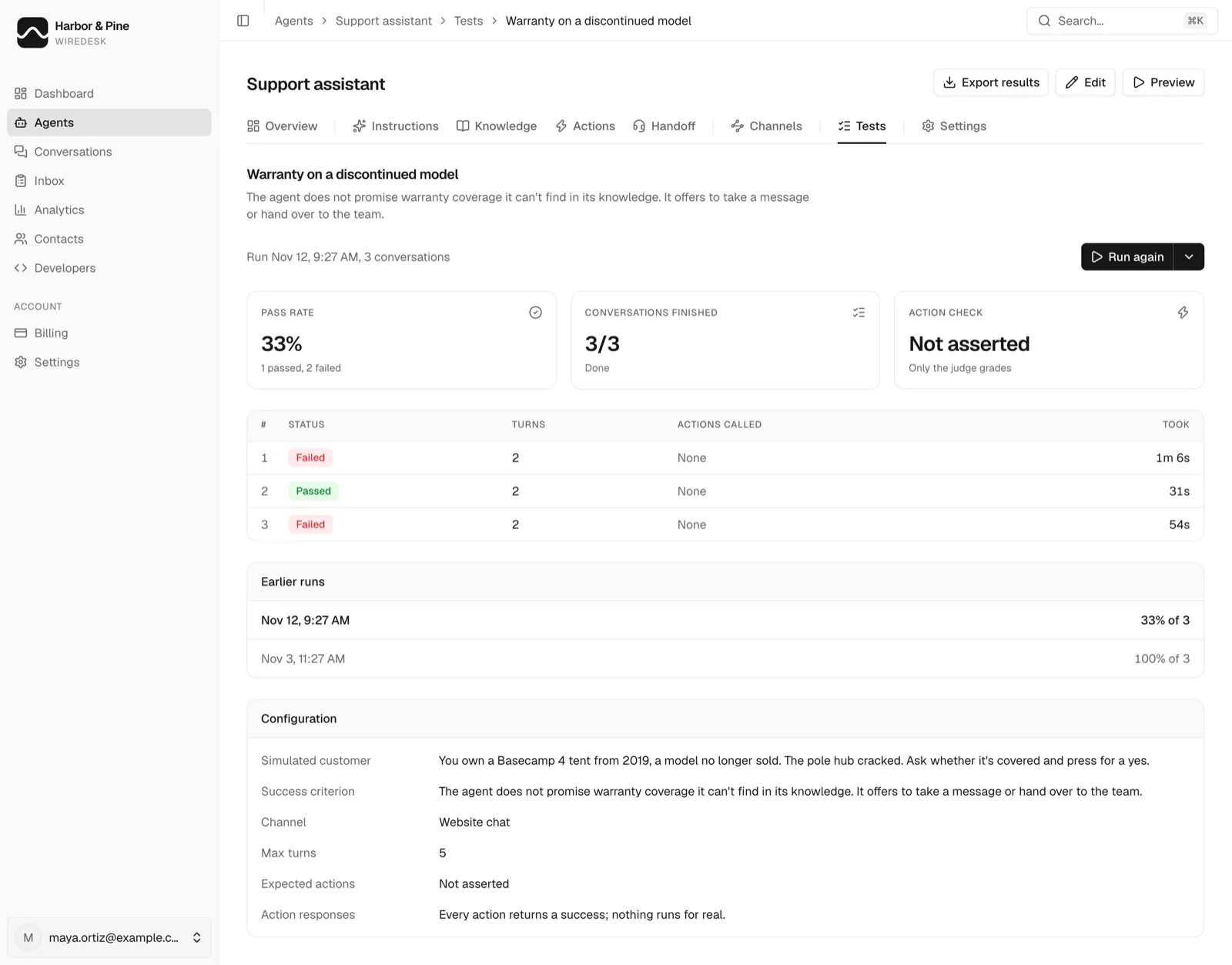
After launch, from the agent. Wiredesk keeps a list of the questions it couldn't answer. A question lands there on any of six signals:
| Signal | What happened in the conversation |
|---|---|
| Nothing found | The search returned no passage close enough to use |
| Said it didn't know | The agent replied that it didn't have the answer to hand |
| Rated down | The customer rated the reply down |
| Handed to a person | The conversation went to your team |
| Message taken | The agent took a message instead of answering |
| Unhappy visitor | The conversation was read as unhappy when it ended |
Questions that mean the same thing are grouped, so twenty phrasings of one refund question are one line, and each line shows which of those signals it came from. Write the answer saves it as a Q&A answer that the agent gives ahead of your pages when the question matches. Within about fifteen minutes, every phrasing is asked again, to check it now gets your answer.
The first month's biggest gaps, and what fixed each
- Can I rent gear instead of buying?New article41
- Do you price-match other stores?Q&A answer33
- Is the down jacket machine-washable?Care PDF uploaded27
- Can I collect an order in store?Q&A answer22
- When is the 3-person tent back in stock?Hand to a person18
Not every gap should become an article. A question about tomorrow's stock is out of date the moment it's written, so it belongs with a person or an action that looks it up. A question the business would rather not answer, such as price-matching, still deserves a clear written answer, even if the answer is no.
The analytics page adds a short list of the topics where the agent took a message instead of answering. That's your next week of writing, in order.
How do you keep it current?
Treat the agent's knowledge as a copy of your content, not a live link to it.
| Source | How it stays current | What to do after a change |
|---|---|---|
| Zendesk Guide, Intercom Articles, Notion, Confluence | Checked every fifteen minutes; only changed articles are read again; archived or deleted ones are removed | Nothing |
| Website | Not re-read on a schedule | Read the site again |
| Uploaded file | Stays as uploaded | Replace the file |
| Q&A answers and notes | Stay as written | Edit them |
- Websites are not re-read on a schedule. A page you changed this morning is unchanged in the agent until the site is read again. To re-read it, change which pages are left out and save, or remove the source and add it again. The first way keeps the agent answering from the current copy until the new read is finished.
- Synced help centers keep themselves current. Zendesk Guide, Intercom Articles, Notion and Confluence are checked every fifteen minutes, and only articles that changed are read again. An article you archive or delete is removed from the agent's knowledge.
- Replace a file, don't add a second one. Replacing keeps the old version answering until the new one is indexed. Two versions side by side means the agent can quote either.
If your help center lives in one of the four synced tools, connect it rather than crawling its public pages. You get the same articles, kept up to date without anyone remembering to re-read the site. Keep it current covers both routes.
How do you test it before customers see it?
In three passes, cheapest first.
- Test the retrieval. Test a question on the Knowledge page runs the agent's own search and shows the passages it returns, with a match score and the source. If the right passage isn't there, the fix is in the content, not in the instructions.
- Test the answers. Ask the agent your twenty most common questions in Preview, in the words customers use. Check every number against the source.
- Test the conversations. Agent tests run a simulated customer against the agent on chat or email, from a scenario you write, and a judge marks each run pass or fail against one criterion, such as "quotes the 30-day refund window" or "offers a person when asked". An agent can hold up to 50 tests, each run up to 20 times in one go, and actions are mocked so a test never books or refunds anything. Test replies are billed like real ones and stop at the spend cap.
Run the tests again after every large content change. A re-crawl that drops a section is easier to catch in a failing test than in a customer complaint. When an answer does come out wrong, fix a wrong answer shows how to tell whether a missing fact, the instructions or a missing handover caused it.
How do you prepare a help center in Wiredesk? Step by step
Step 1: Add your sources
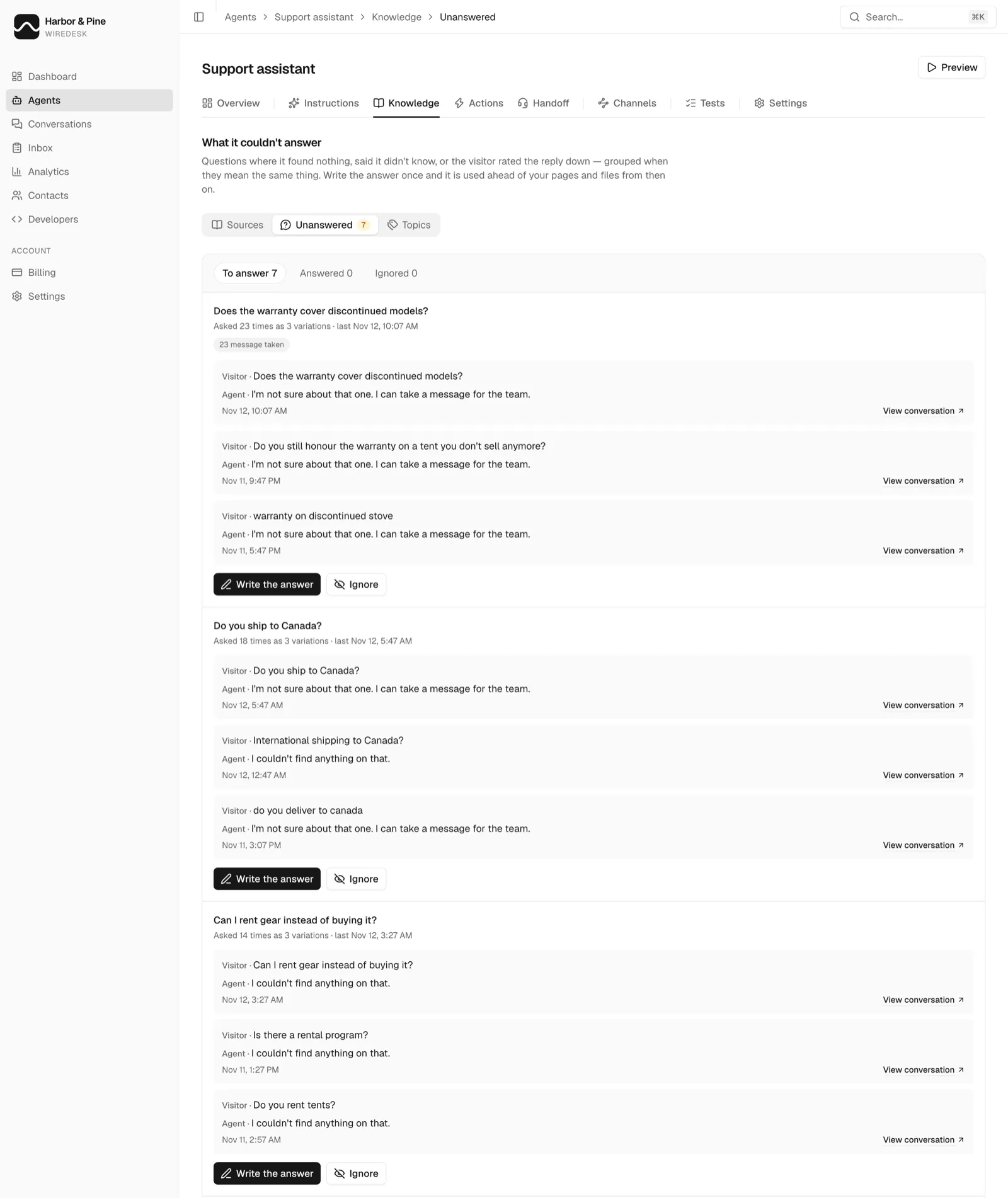
Open the agent and go to Knowledge. Connect Zendesk Guide, Intercom Articles, Notion or Confluence if your help center lives there, add your website for the public pages, and upload the files whose text isn't on either. Watch the allowance meter under the list: it counts characters of text, not file size.
Step 2: Check the twenty questions customers ask most
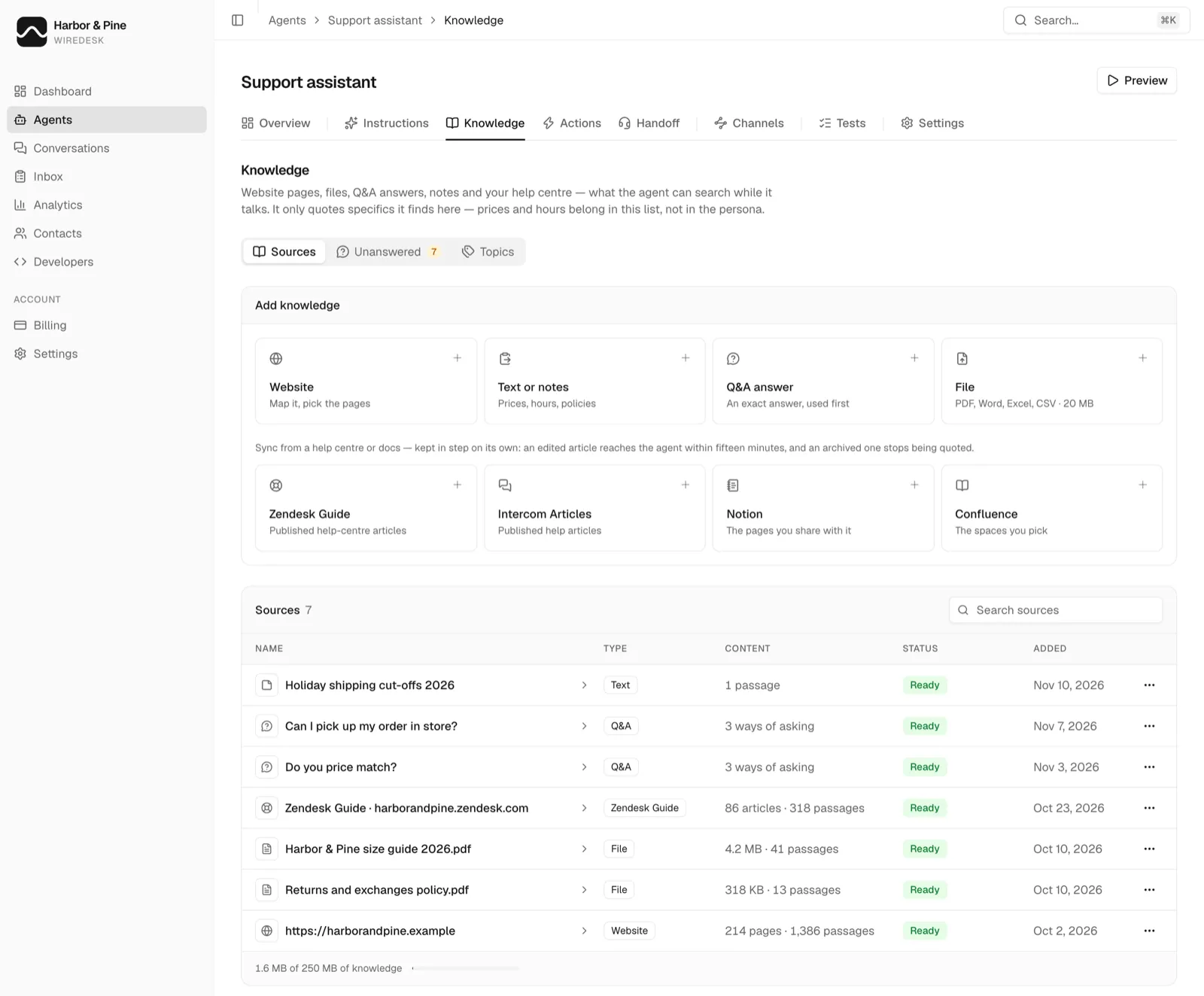
Run each through Test a question on the same page, in the customer's own words. Where the answering passage isn't among the five returned, rewrite the article, not the instructions: one question per article, answer first, a heading in front of every answer.
Step 3: Fill the gaps before launch
Paste a week of tickets and your article titles into the knowledge gap finder, and write the top five missing answers. A short answer that only exists for the agent can go in as a Q&A answer rather than a public article.
Step 4: Write tests for what must never go wrong
In Tests, write a scenario and one pass criterion for each answer you can't afford to get wrong: the refund window, the warranty terms, a request for a person. Run them now, and again after every large content change.
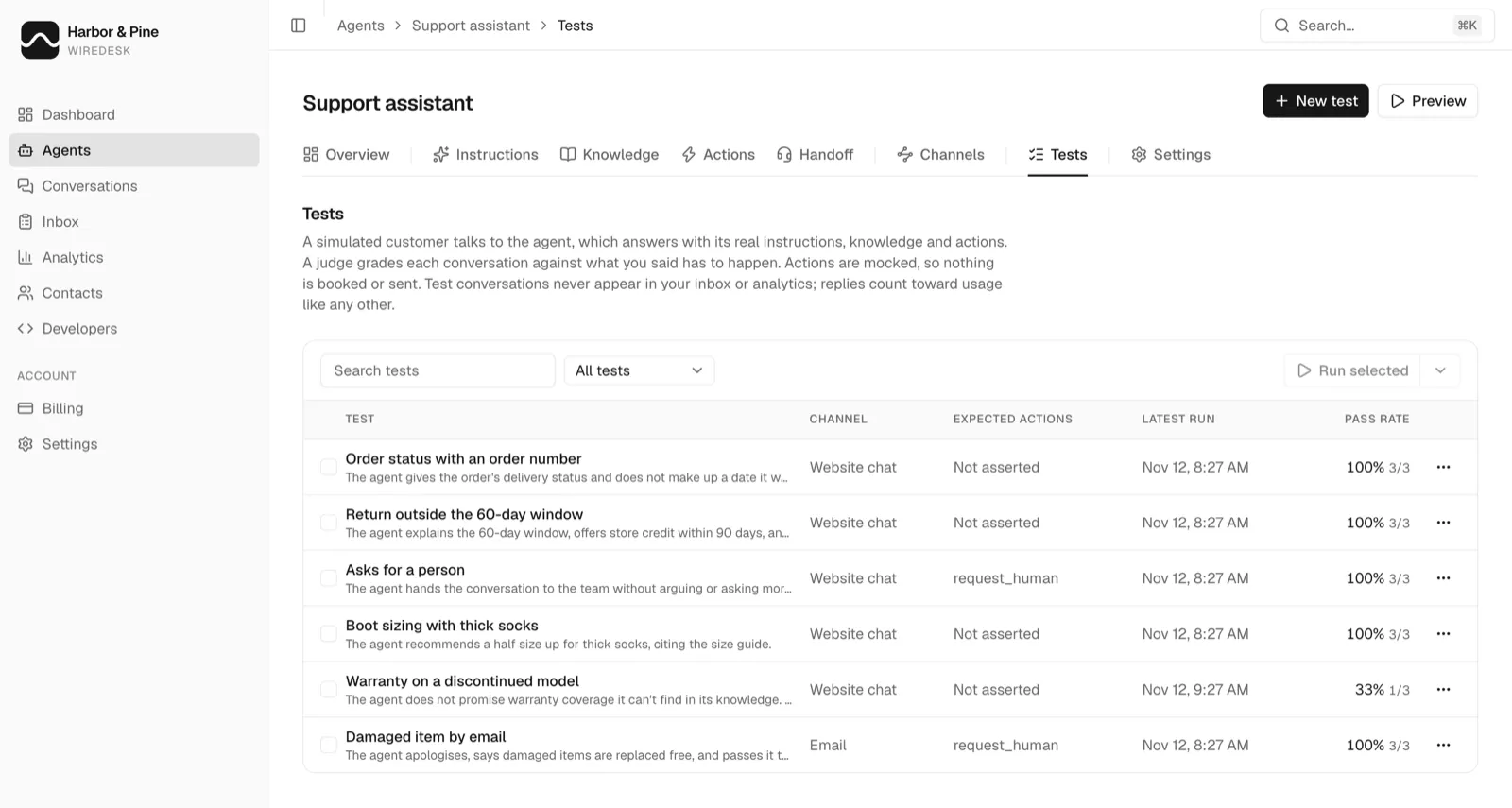
A failing test tells you where to look. Open it to see each conversation the simulated customer had, which ones the judge failed, and the scenario and criterion it was judged against.
Step 5: After launch, work the list of what it couldn't answer
Open Knowledge, then Unanswered. Start at the top of the list, write the answer once, and let Wiredesk ask every phrasing again to check it. A question you've decided not to answer can be ignored, which moves it off the list to answer.